 color palettes
Bold · 5 original colors
Edit in the studio ↗Jelly garden
Playful candy colors with no dark anchor.
Save this palette as an image
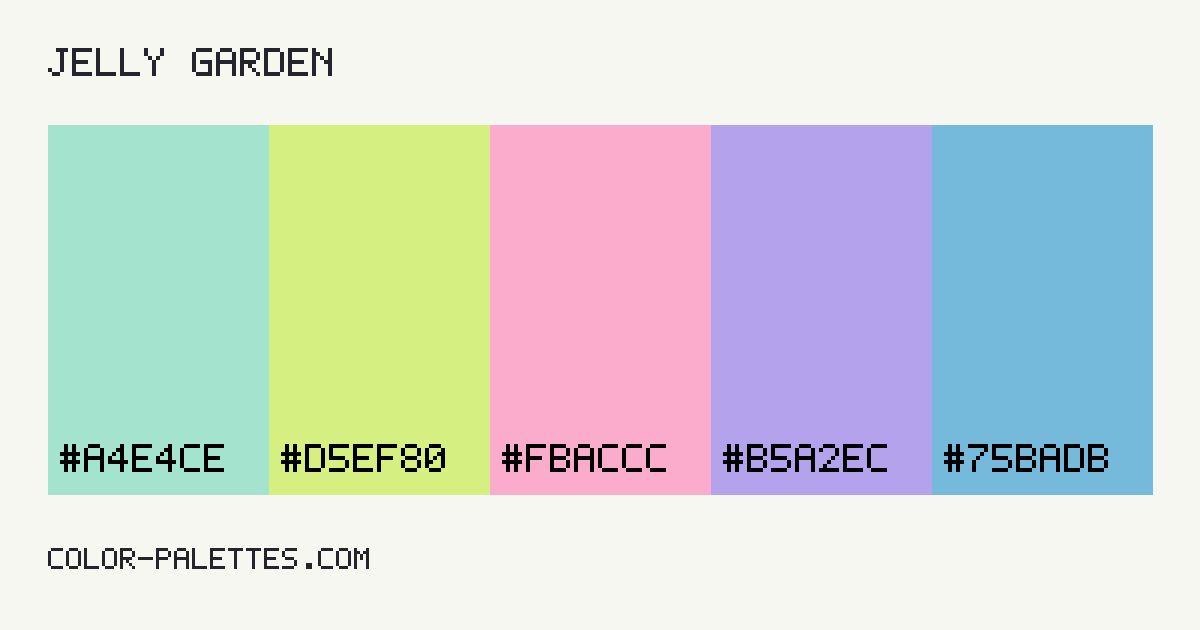 Download palette PNG
A website adaptation.
The original swatches above stay unchanged in the palette generator. This preview adapts them into readable website roles.
studio / notesA color study
An idea worth exploringSmall details.
Small details.
Whole new perspective.
The right colors give everyday ideas a little more character. Start with a clear canvas and make room for what matters.
Read the field notes01 / A fresh start
Let the details do the talking.
A supporting surface, a useful accent, and text you can actually read.
A note on contrast →Thoughtful colors, considered roles.Explore / Create / Refine
Live HTML preview. Button and accent labels use a derived black or white foreground.
The contrast check
| Pair | Foreground / background | Ratio | Text result |
|---|---|---|---|
| Body text | #13201C / #F7FCFA | 16.19:1 | AAA text |
| Card text | #13201C / #E7F2EE | 14.65:1 | AAA text |
| Primary as a text link | #3A7866 / #F7FCFA | 4.99:1 | AA text |
| Button label | #FFFFFF / #3A7866 | 5.17:1 | AA text |
| Accent label | #000000 / #E9B2CA | 11.69:1 | AAA text |
AA normal: 4.5:1. AA large: 3:1. AAA normal: 7:1. Results use unrounded values. These checks do not certify a whole design. Read the methodology.
Take it with you
Your palette, in CSS.
Names describe the role, so your stylesheet stays useful when your colors change.
:root {
  --color-background: #f7fcfa;
  --color-surface: #e7f2ee;
  --color-text: #13201c;
  --color-primary: #3a7866;
  --color-accent: #e9b2ca;
  --color-on-primary: #ffffff;
  --color-on-accent: #000000;
}